
Digital pathology has revolutionized how we analyze tissue samples, enabling researchers and pathologists to work with whole slide images (WSIs) at unprecedented scale and precision. However, one persistent challenge in this field is the lack of standardization in annotation formats across different software platforms. Today, we’ll explore why this matters and provide a practical solution for converting annotations between two popular platforms: ASAP and QuPath.
Why Multiple Tools Exist
QuPath: The Open-Source Powerhouse
QuPath has emerged as one of the most popular open-source platforms for digital pathology analysis. Developed at the University of Edinburgh, QuPath excels at:
- Versatile image analysis: Supports a wide range of WSI formats through Bio-Formats and OpenSlide
- Machine learning integration: Built-in tools for training classifiers and applying AI models
- Scriptable workflows: Groovy scripting enables automated, reproducible analysis pipelines
- Research-focused features: Extensive measurement tools, statistical analysis, and data export capabilities

QuPath’s strength lies in its comprehensive analysis ecosystem, making it ideal for research applications where complex image analysis workflows are needed.
ASAP: Streamlined Annotation Excellence
ASAP (Automated Slide Analysis Platform) takes a different approach, focusing on efficiency and ease of use for annotation tasks:
- Lightweight and fast: Optimized for smooth navigation of large WSI files
- Intuitive annotation interface: Clean, user-friendly tools for manual annotation
- Multi-user collaboration: Designed with clinical workflows in mind
- Specialized annotation features: Excellent tools for precise polygon and region marking
ASAP shines when the primary goal is creating high-quality manual annotations, particularly in clinical or educational settings.
The Annotation Format Problem
Let’s walk through a practical example. Imagine you have metastases annotations created in ASAP that you want to import into QuPath for advanced analysis. Here’s what the ASAP XML format looks like:
<?xml version="1.0"?>
<ASAP_Annotations>
    <Annotations>
        <Annotation Name="Annotation 0" Type="Polygon" PartOfGroup="metastases" Color="#F4FA58">
            <Coordinates>
                <Coordinate Order="0" X="12711.2998" Y="88778.1016" />
                <Coordinate Order="1" X="12612.7998" Y="88895.5" />
                <!-- More coordinates... -->
            </Coordinates>
        </Annotation>
    </Annotations>
    <AnnotationGroups>
        <Group Name="metastases" PartOfGroup="None" Color="#ff0000">
            <Attributes />
        </Group>
    </AnnotationGroups>
</ASAP_Annotations>
To use these annotations in QuPath, we need to convert them to GeoJSON format, which looks like this:
{
  "type": "FeatureCollection",
  "features": [
    {
      "type": "Feature",
      "geometry": {
        "type": "Polygon",
        "coordinates": [[[12711.2998, 88778.1016], [12612.7998, 88895.5]]]
      },
      "properties": {
        "name": "Annotation 0",
        "classification": "metastases",
        "isLocked": false,
        "color": [255, 0, 0]
      }
    }
  ]
}
A Python Converter
Using Claude.AI, a Python script was developed that handles this conversion automatically. Here’s the complete solution:
#!/usr/bin/env python3
"""
Convert ASAP XML annotations to GeoJSON format for QuPath import.
Supports polygon annotations with groups and attributes.
"""

import xml.etree.ElementTree as ET
import json
import argparse
import os
from typing import Dict, List, Any


def hex_to_rgb(hex_color: str) -> List[int]:
    """Convert hex color to RGB values."""
    hex_color = hex_color.lstrip('#')
    if len(hex_color) == 6:
        return [int(hex_color[i:i+2], 16) for i in (0, 2, 4)]
    return [255, 0, 0]  # Default to red if invalid


def parse_asap_xml(xml_file: str) -> Dict[str, Any]:
    """Parse ASAP XML file and extract annotations."""
    tree = ET.parse(xml_file)
    root = tree.getroot()

    # Parse annotation groups to get colors and properties
    groups = {}
    annotation_groups = root.find('AnnotationGroups')
    if annotation_groups is not None:
        for group in annotation_groups.findall('Group'):
            group_name = group.get('Name')
            group_color = group.get('Color', '#ff0000')
            groups[group_name] = {
                'color': group_color,
                'rgb': hex_to_rgb(group_color)
            }

    # Parse annotations
    features = []
    annotations = root.find('Annotations')
    if annotations is not None:
        for annotation in annotations.findall('Annotation'):
            name = annotation.get('Name', 'Unnamed')
            annotation_type = annotation.get('Type', 'Polygon')
            part_of_group = annotation.get('PartOfGroup', 'None')
            color = annotation.get('Color', '#ff0000')

            # Extract coordinates
            coordinates_elem = annotation.find('Coordinates')
            if coordinates_elem is not None and annotation_type.lower() == 'polygon':
                coords = []
                for coord in coordinates_elem.findall('Coordinate'):
                    x = float(coord.get('X'))
                    y = float(coord.get('Y'))
                    coords.append([x, y])

                # Close the polygon if not already closed
                if coords and coords[0] != coords[-1]:
                    coords.append(coords[0])

                # Create GeoJSON feature
                feature = {
                    "type": "Feature",
                    "geometry": {
                        "type": "Polygon",
                        "coordinates": [coords]
                    },
                    "properties": {
                        "name": name,
                        "classification": part_of_group if part_of_group != 'None' else 'Unclassified',
                        "isLocked": False,
                        "measurements": {}
                    }
                }

                # Add color information
                if part_of_group in groups:
                    rgb = groups[part_of_group]['rgb']
                else:
                    rgb = hex_to_rgb(color)

                feature["properties"]["color"] = rgb
                features.append(feature)

    return {
        "type": "FeatureCollection",
        "features": features
    }


def convert_asap_to_geojson(input_file: str, output_file: str = None) -> str:
    """Convert ASAP XML file to GeoJSON format."""
    if not os.path.exists(input_file):
        raise FileNotFoundError(f"Input file not found: {input_file}")

    # Generate output filename if not provided
    if output_file is None:
        base_name = os.path.splitext(input_file)[0]
        output_file = f"{base_name}_annotations.geojson"

    try:
        # Parse XML and convert to GeoJSON
        geojson_data = parse_asap_xml(input_file)

        # Write GeoJSON file
        with open(output_file, 'w', encoding='utf-8') as f:
            json.dump(geojson_data, f, indent=2, ensure_ascii=False)

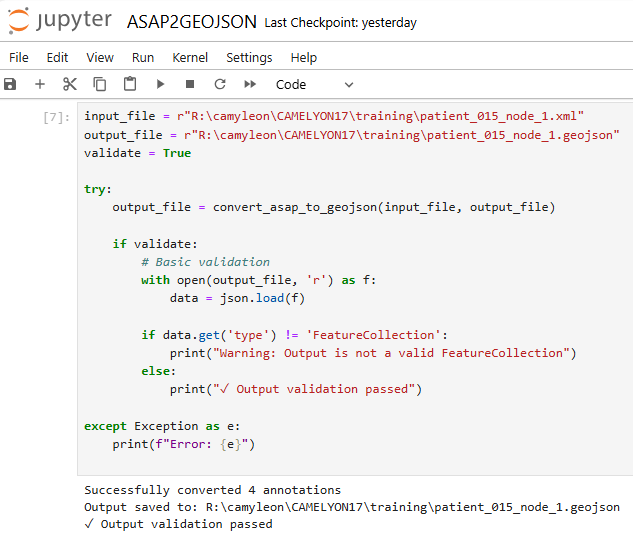
        print(f"Successfully converted {len(geojson_data['features'])} annotations")
        print(f"Output saved to: {output_file}")

        return output_file

    except ET.ParseError as e:
        raise ValueError(f"Invalid XML format: {e}")
    except Exception as e:
        raise RuntimeError(f"Conversion failed: {e}")


def main():
    """Main function for command-line usage."""
    parser = argparse.ArgumentParser(
        description="Convert ASAP XML annotations to GeoJSON format for QuPath"
    )
    parser.add_argument(
        "input_file",
        help="Path to the ASAP XML annotation file"
    )
    parser.add_argument(
        "-o", "--output",
        help="Output GeoJSON file path (optional)"
    )
    parser.add_argument(
        "--validate",
        action="store_true",
        help="Validate the output GeoJSON"
    )

    args = parser.parse_args()

    try:
        output_file = convert_asap_to_geojson(args.input_file, args.output)

        if args.validate:
            # Basic validation
            with open(output_file, 'r') as f:
                data = json.load(f)

            if data.get('type') != 'FeatureCollection':
                print("Warning: Output is not a valid FeatureCollection")
            else:
                print("✓ Output validation passed")

    except Exception as e:
        print(f"Error: {e}")
        return 1

    return 0


if __name__ == "__main__":
    exit(main())
The code can be adapted to work as a Jupyter notebook as well!
How to Use the Converter
Basic Usage
Save the script as asap_to_geojson.py and run:
# Convert single file
python asap_to_geojson.py patient_004_node_4.xml

# Convert with custom output name
python asap_to_geojson.py patient_004_node_4.xml -o my_annotations.geojson

# Convert with validation
python asap_to_geojson.py patient_004_node_4.xml --validate
Importing into QuPath
Once you have the GeoJSON file:
- Open your WSI in QuPath
- Navigate to
File→Import objects→From file - Select your generated
.geojsonfile - The annotations will appear on your slide with preserved colors and classifications
Key Features of the Converter
- Comprehensive Format Handling:
- Polygon Support: Correctly processes complex polygon geometries
- Group Preservation: Maintains annotation groups as QuPath classifications
- Color Translation: Converts hex colors to RGB format QuPath expects
- Coordinate Validation: Ensures polygons are properly closed
- QuPath Optimization: The converter creates GeoJSON with properties QuPath specifically expects
classificationfield for grouping annotationsisLockedproperty for editing permissionsmeasurementsobject for future analysis datacolorarray in RGB format
- Error Handling
- Validates input XML format
- Provides clear error messages for debugging
- Optional output validation to ensure GeoJSON compliance
Testing with Real Data
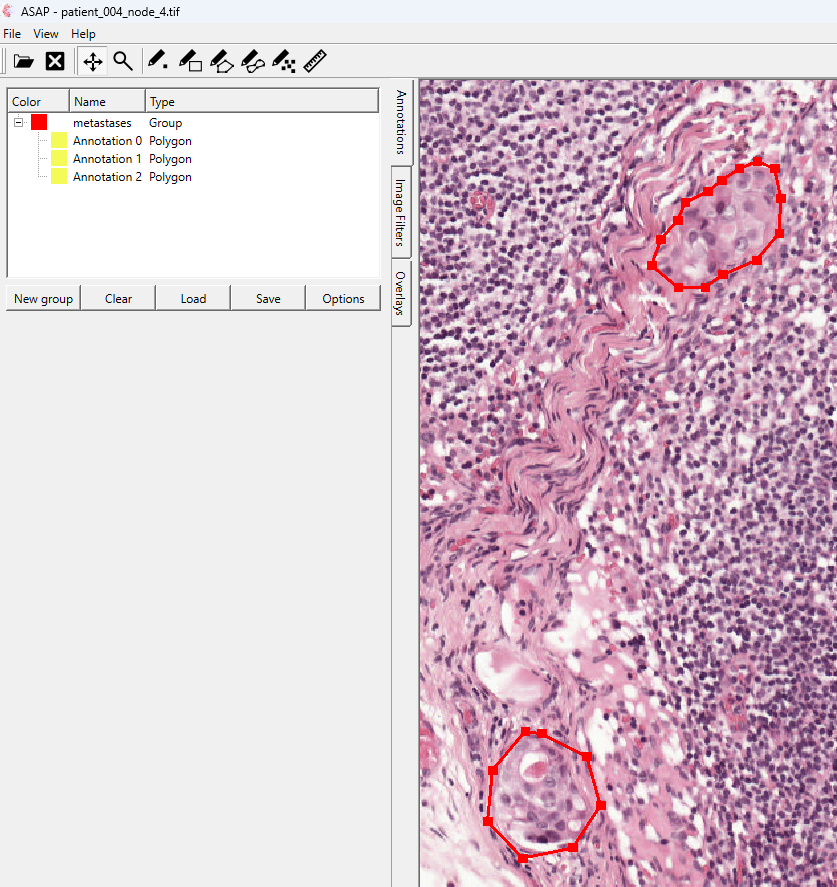
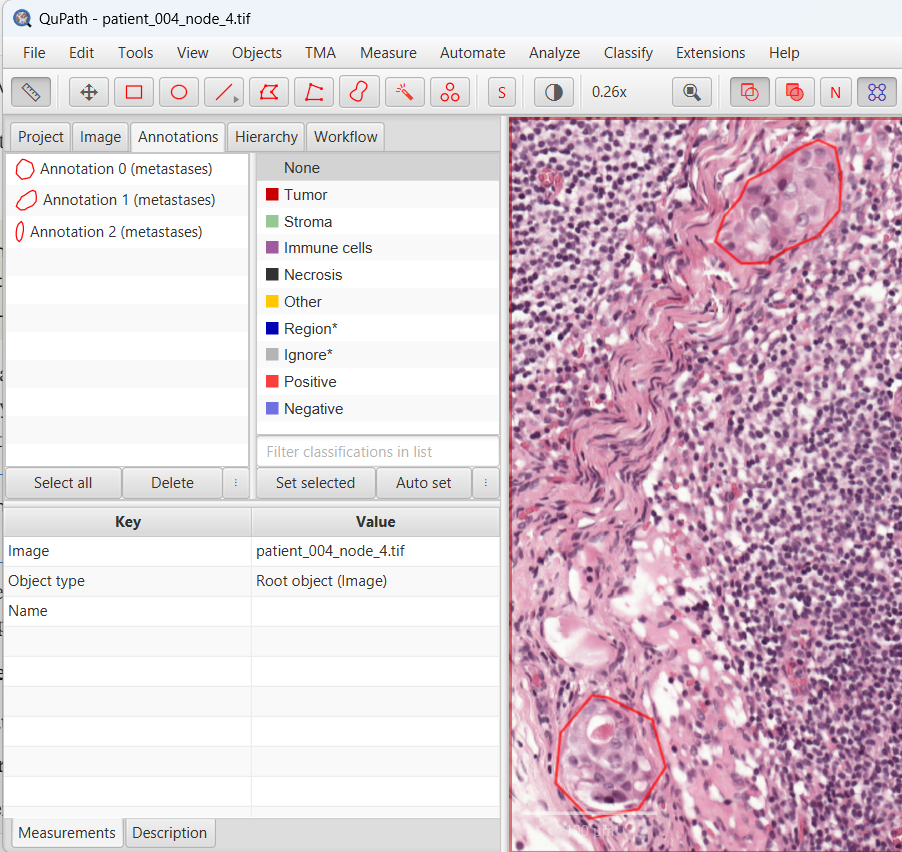
In our example with metastases annotations from the Camelyon Challenge, the converter successfully processed:
- 3 polygon annotations with varying complexity (8, 15, and 12 coordinate points)
- Group classification maintained as “metastases”
- Color information preserved from the original ASAP XML
- Coordinate precision maintained for accurate overlay
Extending the Solution
Supporting Additional Annotation Types
The current script focuses on polygons, but could be extended to support:
- Point annotations for cell counting
- Rectangle annotations for region marking
- Multipolygon features for complex structures
Batch Processing
For large datasets, consider adding:
import glob

def batch_convert(input_pattern: str):
    """Convert multiple ASAP files matching a pattern."""
    xml_files = glob.glob(input_pattern)
    for xml_file in xml_files:
        try:
            convert_asap_to_geojson(xml_file)
            print(f"✓ Converted {xml_file}")
        except Exception as e:
            print(f"✗ Failed to convert {xml_file}: {e}")
Reverse Conversion
A companion script for QuPath-to-ASAP conversion could enable bidirectional workflows.
All Python scripts could be converted into Groovy scripts as well, by the way.
Conclusion
The diversity of tools in digital pathology reflects the field’s rapid evolution and specialized needs. While ASAP excels at creating precise annotations and QuPath provides powerful analysis capabilities, format incompatibility shouldn’t limit your choice of tools.
Digital pathology needs and deserves better standardization efforts! But until then, practical conversion tools like this help us make the most of the excellent software available today.
The complete code is available for adaptation to your specific needs. Whether you’re processing metastases annotations like in our example or working with other tissue structures, this approach provides a solid foundation for cross-platform annotation workflows.